Services
Industries
Locations
B2B SaaS SEO
How to Turn SaaS Organic Traffic Into Qualified Demos
Find whether the problem is the visitor, the page, the demo experience or the sales handoff—then fix the first verified break instead of simply publishing more content.
A recruitment software example showing the buyer, what the page must prove and where the demo journey can break.
Why organic traffic stalls
The right buyer lands on the page—but never sees enough reason to book.
Start with buyer fit. Then check the page, the form and the sales follow-up.
The ideal customer
Who should this page attract?
The page
What must it prove?
Built for us
Show the exact hiring workflow
Works with our stack
Explain integrations, security and rollout
Worth the next step
Offer a demo that matches the buyer’s problem
The five-second test
The buyer can tell who the product is for, how it helps and what happens next
The lost demo
Where does interest disappear?
Wrong visitor
The search attracted a student, job seeker or tiny team
Weak proof
The page makes claims but does not reduce buying risk
Broken next step
The form, routing or response loses the buyer
Google Search shows
Which pages people find and what they searched
Your website shows
Whether they read, trust and start the demo request
Sales confirms
Whether the company fits and a real opportunity exists
Look here
01
the VP or Head of Talent as the product’s example buyer. Replace that role with your own ICP, then check whether the page proves fit and makes the next step clear.
Direct answer
What the business should do
SaaS organic traffic usually fails to create qualified demos for one of four reasons: the wrong people arrive, the page does not prove the product fits their situation, the demo request is difficult, or sales does not qualify and follow up consistently. Define the ideal customer first, then follow visitors from the page they found to the demo request and the sales decision. Fix the earliest verified break instead of publishing more content by default.
- 01A demo request is not automatically a qualified lead; sales must confirm company fit, a real problem and a credible next step.
- 02Search Console shows which searches and pages brought people in. Analytics shows what they did. The CRM shows whether sales accepted them.
- 03Use-case, integration, comparison, pricing, security and implementation pages should each answer a different buying question.
- 04The ideal customer for this guide is a B2B SaaS founder or marketing leader with rising search traffic but weak qualified pipeline.
- 05Fix the highest-value verified break before creating more content.
Article index
Read in order to build the diagnosis, or jump directly to the failing part of the system.
Why can SaaS traffic grow while qualified demos stay flat?
Traffic can grow while qualified demos stay flat because one aggregate organic line combines different people, problems, pages and buying stages.
Keep two audiences separate. This guide is written for a B2B SaaS founder, VP of Marketing or growth leader whose organic traffic is rising without enough qualified pipeline. In the recruitment-software example, the product’s ideal customer is a mid-market employer or institution hiring at volume, and the likely buyer is a VP or Head of Talent who needs faster screening, reliable integrations and a manageable rollout.
A popular informational search can create thousands of visits from students, job seekers, practitioners and buyers who are months away from a shortlist. A low-volume integration or security search can bring five people who already have budget, stakeholders and a technical constraint. Summing both into “organic traffic” hides the decision you need to make.
The opposite error is just as expensive. A product page may attract the right account, but a vague claim, absent implementation detail, risky form or slow follow-up prevents the account from becoming an opportunity. Calling that “bad SEO traffic” sends the content team after new keywords instead of repairing the commercial handoff.
Start with a clearly defined visitor group: the page they entered through, what they appeared to need, their device, market and date range. Follow that group through the demo form, sales qualification and acceptance. You are looking for the first explainable break, not the lowest number on a dashboard.
- 01Demand mismatchThe ranking searches describe research, education or employment rather than a problem the product solves for a paying account.
- 02Wrong pageA generic blog post ranks for a use-case, comparison, integration or governance question that needs product evidence.
- 03Proof mismatchThe page claims an outcome but does not show workflow, implementation, security, limitations or a relevant customer result.
- 04Conversion mismatchThe CTA asks for a sales call before the visitor can establish fit, or the form creates unnecessary friction.
- 05Qualification mismatchMarketing counts every submission while sales accepts only accounts meeting agreed firmographic and problem criteria.
Ready to move on when
Organic visitors are separated by landing page, buying question, device, market and date range.
Stop when
Do not call the channel low quality while early researchers and ready-to-buy visitors remain blended together.
What should count as a qualified demo?
A qualified demo is a submitted request that passes a written fit test and is accepted for a real sales conversation.
Define the test before reviewing channel performance. A practical contract includes target company characteristics, a problem the product can solve, relevant role or buying influence, geography, implementation horizon and any disqualifying conditions. It should be strict enough to guide investment and simple enough for marketing and sales to apply consistently.
Google Analytics recommends separate lead-generation events for submission, qualification, disqualification, sales work and conversion. That event vocabulary is useful because it prevents generate_lead from carrying the meaning of an entire revenue process. The CRM remains the source of truth for the commercial status; GA4 receives the status only when your measurement design sends it back.
Do not change the definition mid-report to make one channel look better. Version the qualification rules, record the effective date and compare like-for-like visitor groups.
| State | Minimum definition | Recorded in | Decision enabled |
|---|---|---|---|
| Form start | First meaningful interaction with the demo form | GA4 | Is the CTA/form being considered? |
| Lead submitted | Valid request reached the success state | GA4 + backend | Did the form complete? |
| Qualified lead | Fits the written account and problem criteria | CRM | Is this worth sales time? |
| Accepted opportunity | Sales accepts need, access and next step | CRM | Is organic creating pipeline? |
| Closed customer | Commercial agreement completed | CRM / billing | Are search visitors creating revenue? |
Ready to move on when
Marketing and sales have one written, versioned definition for submitted, qualified and accepted.
Stop when
Do not let a form submission stand in for a qualified demo or accepted opportunity.
Does the right page answer the visitor’s buying question?
Each recurring buying question needs one clear page with the answer, the proof and a useful next step.
Export the searches and landing pages from Search Console for a stable comparison period. Group the searches by the decision they support: problem recognition, use case, integration, comparison, security, implementation, pricing or vendor validation. Then inspect which page Google actually shows.
A mismatch appears when the ranking page cannot complete the visitor’s job. An educational article ranking for an integration search may explain the concept but cannot prove setup depth. A homepage ranking for a specific industry search may name the industry without showing its workflow, controls or customer evidence.
Search Console does not show every low-volume search and groups data under Google’s preferred version of each URL. Treat the export as strong evidence of what people searched, not a complete record of every visitor. Save the date, search type, country, device and filters so another person can reproduce the view.
The report below makes the problem concrete. Its highest-click non-branded searches are led by severance, end-of-service and salary calculators, followed by interview and job-description research. That traffic is real and useful, but the visitor’s immediate task is not necessarily to evaluate recruitment software.
- 01Export the searchesUse Search Console Performance with web search, a 90-day window, and the search, page, country and device views.
- 02Group by buyer decisionGroup language by the decision the visitor is trying to make, not by isolated keyword similarity.
- 03Choose the best pageChoose one primary page to answer the question, provide evidence and offer the next step.
- 04Flag the wrong pagesMark search groups served by the homepage, an unrelated article, competing URLs or no useful page.
- 05Follow what happens nextKeep the landing page with the lead record so marketing and sales can see whether it produced a qualified conversation.
Ready to move on when
Each recurring buying question has one clear page with the answer, evidence and next action.
Stop when
Stop when a generic article, homepage and product page are all trying to answer the same question.
A three-month Search Console report showing the highest-click non-branded searches.
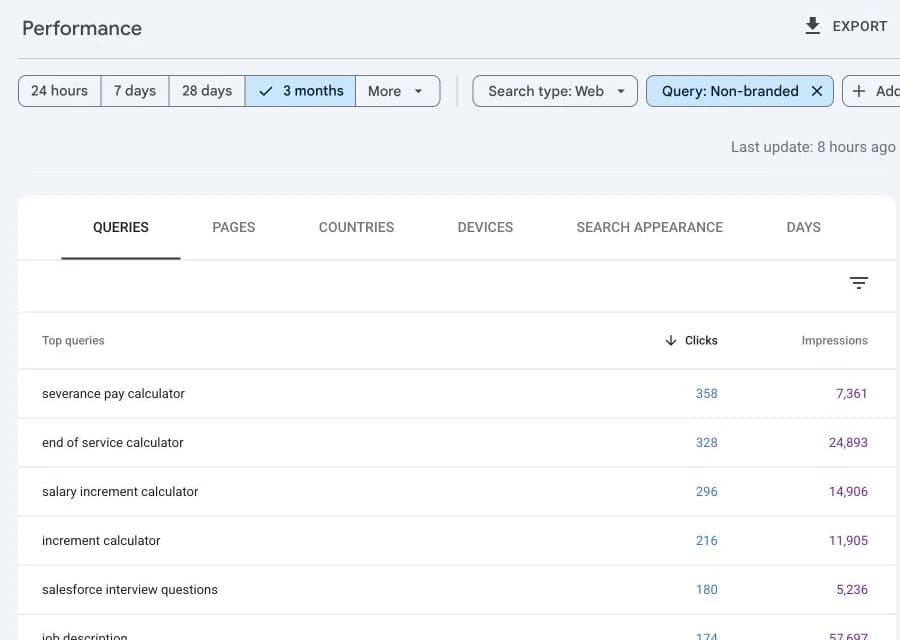
Swipe horizontally to inspect the report
Look here
02
the non-branded filter and the visitor’s immediate task. The leading searches solve calculation and job-research needs rather than an obvious software-buying decision.
How do you join Search Console, GA4 and CRM data?
Use the landing page, date range and a privacy-safe lead ID to connect the reports. Do not pretend Analytics reveals the exact Google search made by every lead.
Link Search Console and GA4 so the same landing-page report can show Google clicks alongside website activity. Google only allows a limited set of shared views here: landing page, device and country. It does not give you a person-by-person record of the exact search that produced each lead.
Track when someone starts and successfully submits the demo form, then create a random internal lead ID after a successful submission. Keep the landing page, traffic source, consent state and submission time with that lead. When sales qualifies or accepts the lead, update the internal record without sending names, email addresses or form answers into Analytics.
For a small lead volume, a weekly export can answer the question. A larger program may need a governed data warehouse. No reporting setup can repair actions that the website never tracked in the first place.
| What to keep | Example | Why keep it | Privacy rule |
|---|---|---|---|
| First page visited | /solutions/university-recruiting | Connect demand, behavior and lead outcome | Store the standard page path, not form text |
| Internal lead ID | ld_7f3… | Reconcile submit and CRM state | Use a random internal ID |
| First traffic source | google / organic | Preserve acquisition context | No personal data |
| Type of need | use-case | Compare why visitors reached the page | Use a short, agreed list |
| Sales outcome | accepted | Separate leads from pipeline | Send state, not contact details |
| Decision time | 2026-07-29T09:00Z | Calculate response time and reporting periods | Use UTC consistently |
Ready to move on when
The landing page, date range and a privacy-safe lead ID can be reconciled across systems.
Stop when
Do not claim that the linked reports reveal the exact Google search made by each lead.
A calculation based on the six highest-click non-branded searches visible in the preceding Search Console report.
What the real search mix shows
The traffic is solving an employment question—not necessarily choosing software.
Highest-click non-brand searches · three-month view
Top six non-brand searches
77% of their clicks came from calculators
77%
The remaining 23% of clicks in the visible top-six rows came from interview and job-description research.
Commercial interpretation
What the visitor needs
A calculation, employment answer or interview resource.
Why traffic can look successful
Helpful utilities can earn large search visibility and clicks.
Why demos may stay flat
The visitor may never be evaluating recruitment software.
What must be checked next
Connect the landing page to demo requests and sales-qualified outcomes.
Safe conclusion
Search Console proves the search mix. It does not prove which visitor became a qualified demo.
Look here
03
the difference between valuable search traffic and software-buying intent. Four calculator searches produced 1,198 of the 1,552 clicks in the visible top-six rows.
Where are qualified prospects dropping out?
Compare each step with the one before it, then check whether the loss came from the wrong visitor, weak proof, form friction, poor follow-up or broken tracking.
A low click-to-form-start rate does not automatically mean the form needs a new color. The visitor group may include many people who are only learning, the CTA may be premature, the product evidence may be weak or the form tracking may be broken. Confirm what is happening before prescribing the fix.
Use both absolute opportunity and relative loss. A page with 80 visits and two accepted opportunities can deserve more investment than a page with 10,000 visits and zero form starts. Conversely, a high-volume page can be valuable for assisted demand even when last-click demos are rare. The page needs an explicit job and evaluation window.
| Observed break | Likely hypotheses | Check next | Responsible team |
|---|---|---|---|
| Impressions → clicks | Weak relevance, title mismatch, wrong result type | Search-result and page review by device and market | SEO + product marketing |
| Clicks → engaged session | Slow page, wrong promise, tracking discrepancy | Landing speed, page content and GSC/GA delta | Engineering + analytics |
| Engaged → form start | Weak proof, wrong CTA, early sales ask | Session behavior, CTA context, product evidence | CRO + product marketing |
| Form start → submit | Field friction, errors, privacy concern | Field-level error and abandonment QA | Growth + engineering |
| Submit → qualified | Traffic or criteria mismatch | Disqualification reason by page and type of need | Revenue operations |
| Qualified → accepted | Poor routing, slow follow-up, no active project | Response time and sales disposition | Sales leadership |
Ready to move on when
The first meaningful loss has a defined visitor group, a tested explanation, a responsible person and a next check.
Stop when
Do not redesign the form, page or keyword portfolio before validating that the observed break is real.
What does a complete SaaS diagnostic look like?
A complete diagnostic follows one clearly defined group of visitors from Google to a sales decision and records the evidence that changes the next action.
Consider a modeled mid-market recruitment platform. Search Console shows 1,000 clicks to a cluster of university-recruiting pages during a 90-day window. GA4 records 620 engaged organic sessions, 48 demo-form starts and 18 submitted leads. The CRM marks seven leads qualified and accepts three as opportunities. These values are fictional and exist only to demonstrate the workflow.
The intermediate decision is the useful part. Search review shows that the generic recruiting guide attracts job seekers, while the university use-case page attracts institution and employer language. Form abandonment is moderate, but most disqualified submissions originate from the generic guide. The team does not redesign every form. It gives the use-case page clearer implementation proof, changes the guide CTA to a planning template, and routes relevant internal links toward that use-case page.
Human review checks the search groups, tests the form tracking, samples CRM outcomes and confirms that “accepted opportunity” means the same thing across sales representatives. The change is accepted only when tracking coverage exceeds the agreed threshold, duplicate leads are reconciled, the reporting period is stable and sales validates the visitor group.
- 01ContextDemo-led recruitment software serving institutions and employers; 90 days of non-brand search visitors.
- 02InputsSearch Console search/page export, GA4 landing and lead activity, CRM outcomes and response times.
- 03ProcessGroup searches, define each page’s job, test tracking, connect lead IDs, compare each step and review failed leads.
- 04Intermediate decisionSeparate educational and commercial journeys instead of treating all organic visits as demo-ready.
- 05OutputOne measurement repair, one use-case page improvement, one CTA change and one sales-routing check.
- 06Acceptance criteriaA reproducible visitor group, tested tracking, stable definitions, no personal data in analytics and sales-approved outcomes.
Ready to move on when
The fictional example produces one clear decision and a measurable pass/fail test.
Stop when
The fictional values teach the method; they are not a benchmark, forecast or client result.
A six-stage example using fictional values to show how a SaaS team finds the first meaningful loss.
Where prospects drop out
Follow the visitor from Google to a real sales conversation.
Use this sequence with your own traffic, demo and sales numbers.
The largest drop is not automatically the most valuable fix. Check whether the lost visitors match the ICP and whether the page answers a real buying question.
Look here
04
the reductions from visitors who stayed to demo activity, and from demo requests to sales acceptance.
What should the team fix in the next 90 days?
The first 90 days should repair tracking, clarify what each important page must do and improve the pages closest to a buying decision before creating more content.
Sequence work by dependency. A new comparison page cannot be judged if generate_lead fires twice, qualification reasons are blank or the CRM discards the original landing page. A perfect dashboard cannot create pipeline if the product page never answers implementation or risk questions.
Each item needs a responsible person, the visitors or leads it affects, a clear expectation, supporting evidence, a pass/fail condition and a review date. “Improve conversion” is not a task. “Add implementation timeline and security information to the university recruiting page; measure demo starts and sales-accepted opportunities from non-brand search visitors over the next complete 60-day period” is.
| Weeks | Work | Deliverable | Exit condition |
|---|---|---|---|
| 1–2 | Definitions and instrumentation QA | Event/CRM measurement contract | Events, IDs and dispositions tested |
| 2–4 | Search-to-page review | Buying-question and page map | Every priority search group has one clear page |
| 4–7 | Proof and CTA repair | Updated high-intent page journeys | Evidence and next action match intent |
| 7–10 | Routing and follow-up | Lead handoff and SLA review | Accepted/disqualified reasons complete |
| 10–13 | Results review | Decision memo and next backlog | Sales, analytics and SEO agree on findings |
Ready to move on when
The 90-day plan ranks verified commercial problems by reach, value, confidence, effort and dependency.
Stop when
Do not prioritize publishing volume when a closer-to-revenue measurement or page failure remains open.
A four-cell matrix comparing how close the visitor is to buying with how much proof the page provides.
What to fix first
Fix the pages closest to a buying decision first.
This turns the diagnosis into a practical 90-day plan instead of another traffic report.
Priority 1
Ready to buy / not enough proof
Add product evidence, security detail and a CTA that matches the buyer.
Priority 2
Ready to buy / strong proof
Protect the page, reduce form friction and check whether sales accepts the leads.
Priority 3
Still learning / not enough proof
Do not create more content until there is a useful path to the product.
Priority 4
Still learning / useful proof
Help the visitor progress; do not judge the page only by immediate demos.
Look here
05
the “ready to buy, not enough proof” cell. It is often the fastest place to test a commercial page improvement.
How do you know the fix actually worked?
The diagnosis is trustworthy when another person can reproduce the visitor group, tracking rules and sales outcome without relying on one dashboard screenshot.
Compare Search Console clicks with GA4 organic sessions, but do not expect the numbers to be identical. Privacy, processing, JavaScript availability, time zones, report scope and Google grouping data under its preferred URL can all create differences. Investigate material changes in the gap rather than forcing the totals to match.
Test each event in the browser and backend, inspect duplicate and missing lead IDs, verify qualification reasons with sales, and retain the exact filters used in every report. Compare complete periods and label modeled calculations, third-party estimates and first-party observations separately.
Bring in an expert when cross-domain flows, consent, server-side tracking, crediting a lead across many marketing touches or data-warehouse joins create material financial or privacy risk. The responsible person still needs a plain-language acceptance document: what changed, what the data proves, what it does not prove and what decision follows.
- 01ReproducibleThe date range, filters, definitions, joins and exclusions are stored with the result.
- 02Complete enoughMissing and duplicate events remain below the agreed tolerance for the decision.
- 03Commercially reviewedSales confirms qualification and opportunity meanings and samples individual dispositions.
- 04Privacy-safeAnalytics events contain state and internal identifiers, not email addresses, names or ungoverned form content.
- 05Decision-readyThe review names the next page, measurement or routing change and the condition for accepting it.
Ready to move on when
A responsible person can reproduce the report, check the tracking rules and explain the decision to sales.
Stop when
Do not close the diagnostic until tracking, privacy, qualification and follow-up checks have owners.
FAQ
Questions about SaaS organic traffic qualified demos
References
Official information and verification scope
Product behavior and reporting limitations were checked against current primary documentation. Modeled cohorts are visibly labelled and are not customer results or industry benchmarks.
View references and verification notes (8)
- 01Google Analytics Help: Recommended events
Official definitions for generate_lead, qualify_lead, disqualify_lead, working_lead and close_convert_lead.
- 02Google Analytics Help: Event parameters
Official guidance on adding context to GA4 events; reviewed for the measurement contract.
- 03Google Analytics Help: Connect Search Console to Google Analytics
Official report availability, compatible dimensions, retention window and linking limits.
- 04Google Analytics Help: BigQuery Export
Official description of GA4 raw-event export and the boundary between received events and linked product data.
- 05Google Search Console Help: Performance report: overview and setup
Official definitions for clicks, impressions, CTR, position, dimensions and reporting windows.
- 06Google Search Console Help: Performance report: dimensions and data groupings
Official query privacy, truncation and canonical URL aggregation limitations.
- 07Google Search Console Help: Performance report: common tasks and use cases
Official workflow for query, page, CTR and performance-change analysis.
- 08Google Search Console Help: About Search Console data
Official explanation of GSC/GA discrepancies, privacy omissions, processing and time-zone differences.